Posts

Showing posts with the label Design Patterns

Design Patterns Series 21 - How to create your own pattern?

By this post we finish our design pattern series. This post gives you a guide for how to build your own pattern in ten easy steps. Just follow along, and you are on the route to fame and fortune. If you don't see an established design pattern where you think there should be one?. You can create your own design pattern, and you can publicize that pattern, getting it into design pattern repositories around the world. Remember, design patterns are supposed to make solutions easier. Don't create a design pattern just for the sake of creating a new pattern if it's not going to be helpful. After all, patterns are supposed to be tools, not hindrances. Pattern Catalog Style : The best way to start anything is with a guide of some kind, and for design patterns, that guide is the Pattern Catalog Style . There are ten sections in a pattern catalog style : Intent Motivation Applicability Structure Participants Collaborations Consequences Implementation/Sample Code Kn...
Design Patterns Series 20 - Double Buffer, Recycle Bin, and MVC Patterns

In this post we will explore the last three patterns in our design patterns list, Double Buffer Pattern , Recycle Bin Pattern , and Model/View/Controller (MVC) Pattern. Double Buffer Pattern : Double Buffering is used to avoid screen flicker when you are displaying graphics. The idea is that you perfrom your multi-step graphics creation off-screen in a buffer and then flash the results on the screen when they're complete. The process is called Double Buffering  because the screen display buffer is one buffer and the buffer in which the images are prepared is the second buffer. Use a Double Buffer  when generating revised datasets for an asynchronous processor. When the new data is complete and self consistent, redirect the asynchronous processor to the alternate buffer. Recycle Bin Pattern : If your code uses many objects and the object-creation process is time - and resource - intensive, you might want to use the Recycle Bin Pattern . The idea is that when you're do...

Design Patterns Series 19 - Circular Buffer Pattern

Image
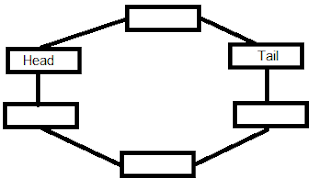
Circular Buffer Pattern : Circular Buffer  is perfect when one part of your code stores data and another part reads that data asynchronously. Makes very efficient use of memory. A Circular Buffer  is a memory allocation scheme where memory is reused when an index, incremented modulo the buffer size, writes over a previously used location. A Circular Buffer  makes bounded queue when separate indices are used for inserting and removing data. The queue can be safely shared between threads (or processors) without further synchronization so long as one processor en-queues data and the other de-queues it. You store data items in the various locations in a ring buffer and keep track of reading and writing operations  by labeling one location the Head  and one the Tail . When you store an item in the Circular Buffer you store the item at the tail location, and the tail advances to the next location. When you read an item, you read the item at ...

Design Patterns Series 18 - More Design Patterns

This Post will discover more than one design pattern. They are all good patterns, but some are not used these days. And some are just plain hard to implement, like the Interpreter Pattern . Abstract Factory Pattern : The Abstract Factory Pattern describes a factory of factories, or, more properly thought of, an abstract specification for an actual object factory . Here's the problem: sometimes you might need more than one factory to create objects of a similar nature. An Abstract Factory  is usually implemented as an abstract class that real, concrete factories extend. That unifies what the concrete factories do, while allowing leeway to fit differing requirements. The Abstract Factory Pattern  should " provide an interface for creating families of related or dependent objects without specifying their concrete classes. " Prototype Pattern : The Prototype Pattern  says that when it takes a lot of resources, or a lot of code, to create an object, you should co...

Design Patterns Series 17 - Mediator Pattern

The Mediator Pattern : The Mediator Pattern supports coordination between objects. it makes the coupling looser by having all objects report state changes to the mediator and take commands from the mediator. When you use a mediator, you are encapsulating the interaction between objects. Each object no longer has to know in detail how to interact with the other objects. The coupling between objects goes from tight and brittle to loose and agile. You can use the Mediator Pattern to " define an object that encapsulate how a set of objects interact. Mediator promotes loose coupling by keeping objects from referring to each other explicitly, and it lets you vary their interaction independently. " The  Mediator Pattern  should your first choice as a possible solution any time you have a set of objects that are tightly coupled. If every one of a series of objects has to know the internal details of the other objects, and maintaining those relationships becomes a problem, th...

Design Patterns Series 16 - Command Pattern

Today we will discover another pattern from our design patterns list, The Command Pattern   The Command Pattern : The Command Pattern  lets you package complex commands into a single one. Rather than having to preform the multiple steps needed to execute each command every time, you can create a bunch of ready-to-use command objects, each of which can handle multiple steps internally. Each command is already configured with  its target and the action it's supposed to perform, so a set of command objects can act as a ready-made toolkit, already configured and all set to operate on the target objects they're supposed to handle. The Command Pattern  says you should encapsulate all the separate actions into objects configured for specific targets. This gives you a number of objects that act like a set of tools, ready to be used. In other words, the idea here is encapsulation.  You are encapsulating a set of complex actions, targeted at a particular target, ...

Design Patterns Series 15 - State Pattern

This Post will be about The State Pattern where an object keeps track of its internal state, and can change its behavior based on that state. The State Pattern : The State Design Pattern will " Allow an object to alter its behavior when its internal state changes. The object will appear to change its class. " In other words your code should keep track of an internal state. Any part of the code can check what the current state is and react accordingly. When you use the State Pattern , any part of your code can check what state is current. That clarify and centralize the workings of very large pieces of code because you have control over what far-flung code segments do, just by changing the current state. In general, The State Pattern is useful when you have got a lot of code that's getting more and more murky and complex. If you can compartmentalize the working of what you are trying to do into a set of independent states, you can compartmentalize your code. ...

Design Patterns Series 14 - Composite Pattern

Image
This post will be about the second pattern in the alliance. In the last post we explored first pattern in this alliance, the Iterator Pattern , and today is the time of  Composite Pattern . The Composite Pattern : The Composite Pattern  is all about creating tree-like structures where the leaves in the structure can be treated in the same way as the branches(which are substructures that can contain multiple leaves, as well as other branches). The idea here is that, to make life easier, you should be able to treat the leaves and compositions of leaves in a tree structure the same. You use the Composite pattern  to " Compose objects into tree structures to represent part-whole hierarchies. Composite lets clients treat individual objects and compositions of objects uniformally ". That is typical of Composite Pattern - when you ask a branch to perform some action, it iterates over all its contained leaves and branches. The insight behind The Composite Pattern is r...

Design Patterns Series 13 - Iterator Pattern

This post and the next will be about two allied patterns: the Iterator Pattern and the Composite Pattern . The Iterator Pattern: The Iterator Pattern gives you a way of accessing the elements inside an object without having to know the internal details of that object. When you dealing with a collection of objects, The Iterator Pattern  is the ideal solution. You can use the Iterator Pattern  to " Provide a way to access the elements of an aggregate object sequentially without exposing its underlying representation. " In other words, iterators are designed to let you handle many different kinds of collections by accessing their members in standard, accepted way, without having to know the internal details of those collections. The Iterator Pattern is especially important when the collection you are creating is made up internally of separate subcollections, as when you have mixed hashes with array lists, for example. The design insight here is one of what’s called...

Design Patterns Series 12 - Builder Pattern

Today we have a date with another pattern that give you a clever way of dealing with adapting the process of creating objects. previous post we explored The Template Method pattern  today we will explore its twin,  Builder Pattern . Builder Pattern: We use the Template Method Pattern when we have a multi-steps algorithm with in a certain order and we want to customize some steps. But what about if the number of steps and its order differs from one case to another?!!!!!. In Builder Pattern you don't inherit a template method anymore and then customize that method to create your own object. Instead, to create different types of objects, you allow client code to use different builder objects. The client code now sets the number and sequence of the steps in the algorithm, and selects which builder to use. The Builder Pattern let you " Separate the construction of a complex object from its representation so that the same construction processes can create ...

Design Patterns Series 11 - Template Method Pattern

This post and the next will be about two patterns that give you clever ways of dealing with adapting the process of creating objects: The Template Method Pattern and Builder Pattern . The Template Method Pattern: The Template Method pattern lets sub-classes redefine the steps involved in creating an object.The Template Method will " define the skeleton of an algorithm in an operation, deferring some steps to sub-classes. Template Method lets sub-classes redefine certain steps of an algorithm without changing the algorithm structure. " You should use the Template Method pattern when you have an algorithm that is made of multiple steps, and you want to be able to customize some of those steps. Note That if you want to rewrite everything from scratch every time - if every step has  to be customized by writing it from scratch - then you have no need of a template. Only if you have steps that are shared by various implementations of the algorithm do you need to work w...